
Facebook and Instagram Marketing: The Ultimate Guide
- 31 min read
Facebook and Instagram marketing: does it actually work for B2B?
Adam Yaeger has spent over 15 years running paid media for B2B companies, managed more than $1.7M in ad spend across Meta, LinkedIn, and Google, and has seen firsthand where Facebook and Instagram marketing delivers and where it quietly drains budget. This guide draws on that experience, including work with clients like CodeSignal and SentiLink, to give you a clear picture of what these platforms can and cannot do for a B2B pipeline.
At Llama Lead Gen, the team includes former Facebook marketers who have optimized pages and campaigns across industries including SaaS, FinTech, and HealthTech. The honest caveat upfront: Meta is not the right primary channel for every B2B buyer, and this guide will tell you when it is not. Whether you are a CMO allocating budget across channels or a demand gen lead defending spend to leadership, the case studies and frameworks here are built to sharpen your judgment, not just validate the channel.
Quick Links
- What this guide covers: Facebook and Instagram marketing from setup to pipeline
- Optimizing your profiles and company pages
- What Meta ad setup actually looks like when someone experienced runs it
- Building Your Marketing Campaigns
- How to use Meta ad targeting to reach the right audience
- What comes next after launching your Facebook and Instagram marketing campaign



Elevate Your FB & IG Ads with Proven Strategies
Ready to take your Facebook and Instagram marketing to the next level? Our experienced team has the knowledge and tactics to help you achieve your goals. Schedule a call with us today.
What this guide covers: Facebook and Instagram marketing from setup to pipeline
This guide walks through the core components of running Facebook and Instagram marketing effectively in a B2B context: building and optimizing your profiles and company pages, configuring your ad account correctly, structuring campaigns, and targeting audiences with enough precision to generate qualified pipeline rather than vanity metrics. Each section reflects decisions made in live campaigns, not theoretical best practice; if you want to discuss how these frameworks apply to your specific funnel, schedule a call with the Llama Lead Gen team.

What Facebook and Instagram marketing actually offers B2B advertisers
This section covers the questions that come up most often before a B2B team commits budget: what separates Meta’s platforms from other paid social options, what it typically costs to advertise, and whether the return justifies the spend for longer sales cycles and higher ACV deals. The short answer depends on your funnel stage, audience size, and how well your targeting is configured, which the rest of this guide addresses in detail.
Why Facebook and Instagram marketing reach audiences other platforms can't match
Facebook’s nearly three billion monthly active users and Instagram’s over 2 billion monthly users make them the largest addressable audiences in paid social, by a significant margin. That scale matters for B2B teams because it expands the realistic pool for retargeting, lookalike audiences, and top-of-funnel awareness well beyond what LinkedIn or X can offer at comparable cost.
The caveat worth naming: scale doesn’t automatically translate to the right audience. LinkedIn users arrive with a professional context already active, which can make intent signals cleaner for certain B2B segments. Facebook and Instagram skew toward general consumer behavior, which means your targeting configuration and exclusion logic carry more weight here than on a natively professional platform.
Where Meta’s platforms earn their place is in two areas LinkedIn can’t match. First, the average combined time spent across Facebook and Instagram is roughly two hours per day per user, which creates more inventory and more opportunities to build frequency with a qualified prospect list. Second, these are different platforms: Facebook supports video, text, links, and longer-form discussion, making it better for community engagement, while Instagram tends to drive faster, higher-volume user engagement on a visual-first social media platform.
Instagram in particular favors creative that stops a scroll: Instagram focuses on high-quality visuals, Reels, and AI-curated discovery through Explore, which helps both Instagram and Facebook function as complementary social platforms for reach and response. When a post resonates, the distribution mechanics on both platforms can push it to hundreds of thousands of impressions organically, extending paid reach.
For B2B teams, this combination of scale, visual format depth, and time-on-platform is what makes Facebook and Instagram marketing a defensible complement to search and LinkedIn, not a replacement, but a distinct layer of the funnel worth owning.

What does Facebook and Instagram advertising actually cost?
Facebook’s average cost per click sits at $2 or below, which is a meaningful structural advantage over most paid social alternatives. LinkedIn averages around $5.26 CPC, YouTube around $3.21, and Pinterest around $1.50, according to WebFX benchmarks. X (Twitter) remains the one platform that undercuts Facebook on raw CPC, typically coming in at $1 or less. That single data point explains a lot about why Facebook and Instagram marketing continues to earn budget from performance teams who have run the comparison.
The $2 CPC figure for Facebook is a starting point, not a guarantee. What you actually pay depends on campaign objective, audience targeting depth, creative quality, and how well your ad resonates with the specific segment you are reaching. A lead generation campaign targeting a narrow professional audience in a competitive vertical will cost more than a broad awareness push. That is true on every platform, but it matters here because the benchmark number can create false expectations if you take it at face value without accounting for your specific setup.
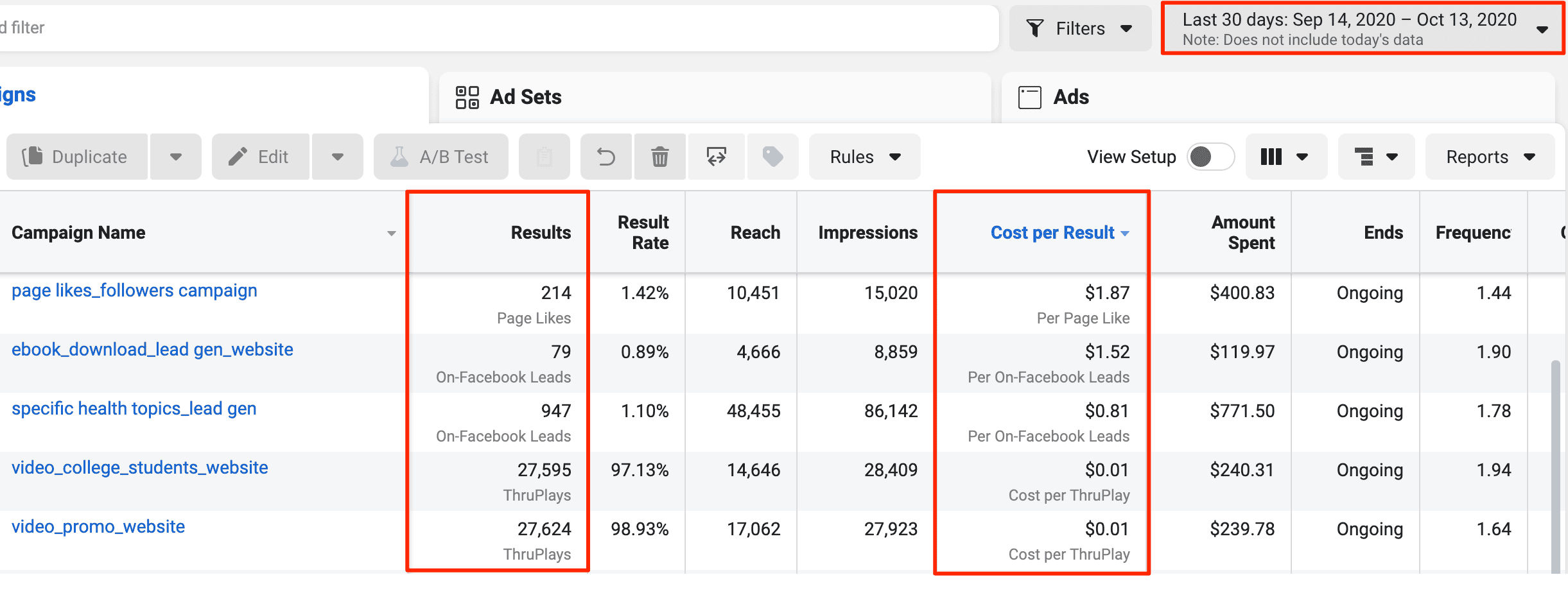
A variety of Facebook and Instagram advertising campaigns we ran for a healthcare client. We achieved low CPCs for each campaign: like/follow, lead gen, video.
Instagram is a different story on cost. The average CPC on Instagram runs closer to $3.56, more than three times the Facebook figure. That gap reflects two things: the types of ad formats that perform on Instagram tend to be heavier on production and placement, and the platform’s audience composition drives higher competition for certain demographics. Facebook skews toward 25-44 with a notable presence of older adults, while Instagram users are concentrated in the 18-34 range and the platform has a higher share of female users, which is why the two networks often pull in different audiences. In practice, the teams at Llama Lead Gen consistently bring CPCs on both Facebook and Instagram to $2 or below by optimizing creative and placement selection together, rather than treating each platform independently.
On reach, Facebook has a roughly three-to-one volume advantage over Instagram based on total platform size. More users means more potential customers, but raw reach does not tell the full story. Users spend about 19.7 hours per month on Facebook versus 11.7 on Instagram, and Instagram tends to generate higher click-through rates, around 0.88% according to AdStage data, because its user base skews younger and the visual-first format drives stronger engagement from that demographic. The practical question for any campaign is not which platform is better in the abstract, but which one matches your audience. If your buyers skew 35 and older, Facebook typically outperforms. If you are targeting a younger or more visually driven segment, Instagram is worth the higher CPC if the CTR and downstream conversion rates justify it.

Is the spend worth it?
Advertising on Facebook and Instagram is not only worth it, but a necessity (nowadays) for most businesses to market their products or services. Your assumption might be that Facebook would be a less successful place to run ads just because of the competition. In reality, though, this couldn’t be further from the truth. Many advertisers have seen a return on investment (ROI) of anywhere from 4-8x as much as they put into their campaign. A massive ROI like that is absolutely worth it, not to mention research that backs up a higher clickthrough rate, conversion rate, and a significantly lower cost-per-conversion as well.
From significant increases in followers to improved purchasing intent to a huge reach to the simple fact that ads are more subtle and less invasive on the platform in general, Instagram ads make up for being a bit pricier with their unparalleled results. Simply put, these two platforms are without a doubt worth your ad spend if you are a business trying to market your products or services online.
Why Meta's targeting changes the cost equation
Setting aside the massive amount of daily active users on Facebook and Instagram, these two platforms are a better choice for your social media marketing because of the sheer amount of targeting options. Facebook has loads of data points on each of its users — what groups you are a part of, everything in your profile, your interests, etc. So it’s no surprise that you can target by just about any of these facets.
Facebook has users of all ages but is particularly popular among older users — great news for advertisers who have struggled to appeal to this demographic. It’s not only a platform for an older demographic, however, it’s also a great platform if your business sells to consumers. Check out a successful ad campaign we ran for one of our clients who is a moving company, trying to get more people to use their moving service.
As for Instagram, the platform caters to consumers on the go — because the social media platform was built specifically for mobile devices, there’s a treasure trove of different ads that can be placed directly into the potential buyer’s hands with very little effort. The swipe up feature, in particular, is a great way for advertisers to showcase their products or services in an unobtrusive manner since users can skip these ads if they’d like.

To learn how to optimize your company’s Facebook and Instagram profiles and pages, continue on to Chapter Two. You know marketing on Facebook and Instagram is important but you haven’t cracked the code yet. Whether you’re new to advertising, have run campaigns but with lackluster results, or are looking for an expert team to optimize your Facebook and Instagram advertising campaigns, we can help you reach your marketing goals.
Our team comprises ex-LinkedIn and ex-Facebook marketers, so we understand how to get you the most bang for your buck. Get in touch with our experts today so we can assist you as quickly and as easily as possible.
Common Facebook and Instagram marketing questions, answered
They are paid placements, images or videos that appear in your target audience’s feed on either platform, formatted to look native to the environment. The key distinction from organic posts is precise audience targeting and direct budget control.
That depends on your cost per qualified lead relative to deal size, not on platform reputation alone.
Through Meta Ads Manager, which controls placements across both platforms from a single campaign.
Benchmarks vary widely by vertical, objective, and audience size. B2B campaigns in competitive categories routinely see CPCs between $1 and $5, but the number that matters is cost per pipeline-qualified lead.
Yes, for most formats, though Instagram-only placements have limited exceptions worth testing.
Generally no, since the ad account is tied to Meta’s infrastructure.
The learning phase typically runs 7 to 14 days before the algorithm stabilizes delivery. Pulling spend early is one of the most common reasons campaigns underperform.
Optimizing your profiles and company pages
Profile optimization and properly configured company pages reduce friction for anyone who clicks through from an ad. Consistent branding, a complete about section, and a clear primary link are the baseline. The caveat: a well-optimized page supports ad performance but does not substitute for strong targeting and creative.

How to optimize your Facebook and Instagram profiles before launching ads
Profile setup is not a formality. Anyone who clicks through from an ad lands on your page first, and an incomplete or inconsistent profile bleeds credibility before your offer even registers. A few seconds is a realistic window before someone moves on.
Before launching any Facebook and Instagram marketing campaign, audit four things. Your profile and cover photos should be current and uploaded at the highest available resolution, since compressed or outdated images signal neglect more loudly than most marketers realize. Your bio, slogan, address, and contact information need to reflect what is actually true today, not what was accurate when the account launched. Set up business accounts on both platforms so analytics, contact buttons, and promotional tools are enabled from the start, which makes it easier to align the page with your business goals and track progress against marketing goals. Any unprofessional content, stale posts, or irrelevant comments should be removed from the page entirely, including replies in older threads that may have drifted off-brand. And your links to your website, key products, and other platforms should be accessible without friction.
One platform-specific constraint worth flagging: Instagram allows only one external link in the profile. If you need to direct traffic to multiple destinations, tools like LinkTree or ContactInBio let you consolidate those links behind a single URL without requiring the visitor to hunt.
The caveat here is that a polished profile supports performance but does not drive it. When Llama Lead Gen optimized the OneV page alongside a paid campaign, the client doubled their social following, reached over 100,000 individuals, and grew their subscriber list by 30%. The profile was a foundation, not the engine.


How to set up and optimize your Facebook and Instagram company pages
Setting up a Facebook Page takes about ten minutes. Navigate to Pages and select Create, then choose between a business or brand page versus a community or public figure page. For most B2B companies, the former applies. From there, enter your business name, category, address, and other basic details. Add a profile picture and cover photo, pin any featured images you want visitors to see first, and customize your URL so the page is easier to find through search. Fill in the description with enough specificity that a first-time visitor understands what you do and who you serve, then publish.

Instagram setup is slightly faster if you already have a personal account. Download the app and tap Sign Up, or log in and skip to step four. Instagram lets you connect directly with your Facebook business page during setup, which links the two accounts and simplifies cross-posting later. Instagram has also become a hub for influencers seeking collaboration opportunities with brands and businesses, which can shape how small businesses present the account as part of their broader social media marketing. Set your username to match your Facebook Page name as closely as possible. Consistency across handles reduces friction for people trying to find you across platforms. Once in Settings, switch to a business account, complete the required fields, and the account is live.
A few setup decisions carry more downstream weight than others. Choosing more than one relevant category on Facebook increases your surface area across different interest and industry clusters, which matters for organic discoverability before you have follower volume or ad budget working for you. Selecting categories that do not accurately reflect your business, however, can attract the wrong audience and skew your page analytics from the start.
On voice: pick one register and apply it consistently across both platforms. Whether that is direct and data-led or conversational and personality-forward, consistency is what makes a brand feel recognizable rather than assembled. The pages Llama Lead Gen manages for eCommerce clients hold to a single visual and tonal standard across every post, which is visible in how the audience engages and how the account reads to a new visitor.
Before running paid campaigns on either platform, build some organic content that reflects your actual positioning. Invite early followers by syncing your contact lists through the platform’s built-in tools. Engage with comments when they come in rather than leaving the conversation one-sided. These steps will not replace media spend, but they give paid activity a more credible surface to land on across social media.


Proven Meta strategies delivered by an experienced Llama
What Meta ad setup actually looks like when someone experienced runs it
Talk to a llama if you want a team that has already worked through the setup decisions described below.
From there, the practical sequence is: get your Ads Manager account configured correctly, learn how to navigate it without friction, then match your creative to the ad formats Facebook and Instagram actually support.
How to set up your Ads Manager account for Facebook and Instagram marketing
With your Facebook and Instagram accounts in place, the next step is getting Ads Manager configured before you touch a single campaign.
Start at business.facebook.com and select Create Account. You’ll enter your business name, link the Facebook account you want associated with Ads Manager, then provide your name and work email. Once inside, go to Business Manager Settings, click Ad Accounts under People and Assets, select Add New Ad Accounts, and choose Create a New Ad Account. Enter payment information, and the account is live.
One thing worth flagging: if your business operates in a regulated category such as financial services or healthcare, Meta may apply additional restrictions at the account level before you can run certain ad types. Check that early rather than after you’ve built out a campaign.

How to connect your Instagram account for Facebook and Instagram marketing
Instagram advertising runs through the same Facebook Ads Manager you just configured, not through a separate platform. That’s worth stating plainly because it catches some teams off guard when they set up their accounts independently and then look for a distinct Instagram interface that doesn’t exist.
To link your Instagram account, go to Business Settings, select Accounts, then Instagram Accounts, and click Add. Enter your Instagram login credentials and the connection is live. From that point, both your Facebook and Instagram pages are available as ad placements within the same campaign structure.
Many B2B teams run cross-platform campaigns through Meta Business Suite precisely because it consolidates asset management, audience targeting, and reporting into one place rather than toggling between two tools—the efficiency compounds when you’re managing multiple creative variants across placements.
One nuance worth noting: just because both accounts are linked does not mean every creative format translates cleanly between platforms. A feed placement optimized for Facebook may underperform in Instagram Stories due to aspect ratio and viewing context. Plan for placement-specific creative from the start rather than retrofitting it later.
Once both accounts are connected, navigate to Ads Manager from your Facebook homepage by clicking the drop-down menu in the upper right corner and selecting Ads Manager. The dashboard presents four primary tabs: Account Overview, Campaigns, Ad Sets, and Ads. Each operates at a distinct level of the campaign hierarchy, which Chapter Four covers in detail. For now, orient yourself to the layout before you begin building.

You can now start advertising from both your Facebook and Instagram pages.

How To Navigate Your Ads Manager Account
Now that you’ve completed the setup of your Ads Manager account for your company Facebook and Instagram accounts, you’ll need to know how to navigate your Ad Manager account.
- To get to Ads Manager from your Facebook homepage, click the drop-down menu on the top right hand corner of your page and select Ad Manager
- From there, you'll be taken to the Ad Manager dashboard. You should see several tabs labeled Account Overview, Campaigns, Ad Sets, and Ads. Each of these tabs serves a unique purpose, which we'll explore more in Chapter Four. For now, familiarize yourself with where things are positioned and make sure you're comfortable with where everything is. You'll need to know these locations when we get to creating and growing your marketing campaigns.


What ad types do Facebook and Instagram support?
The range of ad placements available across Facebook and Instagram is one of the more practical advantages of the platform for B2B campaigns. Rather than static banner inventory bolted onto a publisher’s sidebar, you’re working with native formats that sit inside the same feed a user scrolls for personal content, where people share photos and consume visual content. That context changes how people engage with them.
Both platforms support Stories, Reels, single image, carousel, and video content as the core creative formats. Where they differ is in the placement inventory each one offers.
Facebook placements include:
Desktop and Mobile News Feed (Sponsored Posts): embedded within the user's feed and compatible with photo, video, or swipeable carousel formats.
Stories: ads that appear temporarily between organic Stories content.
Right-Hand Column: desktop-only inventory, and the closest Facebook gets to a traditional display banner. Performance here tends to skew toward remarketing rather than prospecting.
Marketplace: ads surfaced within Facebook's buy-and-sell section, which can work for product-led campaigns but is less relevant for most B2B offers.
Video Feeds: ads appearing in Facebook's Watch section, where users are in an intentional video-consumption mode.
In-Stream Videos: your ad runs between videos, similar to pre-roll. Completion rates vary significantly by video length and audience.
Search Results: ads triggered when users search within Facebook, a placement that is often underused in B2B but worth testing if your audience is actively searching for category terms.
Facebook Audience Network: extends delivery across a network of third-party apps and websites that have opted into Facebook's ad ecosystem. If you want to restrict or exclude specific sites, both options are available in placement settings. Worth reviewing the placement report before scaling here.
Messenger: delivers ads through Facebook's messaging platform. WhatsApp placements are also available if that audience is relevant to your market.
In a campaign run to promote a flavored water product, we served variations of the same ad across Sponsored Content on desktop and mobile, Instagram Feed, Instagram Stories, In-Article, and Audience Network simultaneously. Seeing creative performance broken out by placement at that granularity is where placement-specific decisions become defensible rather than intuitive.
Instagram placements include:
Across several native formats on both platforms, Instagram also differs from other social media platforms in how heavily its placements lean into immersive, mobile-first behavior.
Mobile News Feed (Sponsored Ads): the standard feed placement, supporting photo, video, and carousel formats.
Stories: full-screen vertical placements appearing between a user's organic Stories content. Aspect ratio and viewing context are genuinely different from feed, which is why creative built for one rarely performs equally on the other.
Explore: ads served when users are actively browsing the Explore tab, reaching people outside your existing follower base who are already in a discovery mindset.
IGTV: pre-roll or post-roll ads attached to longer-form Instagram video content, while live videos tend to work better when the goal is direct interaction.
A note on placement selection
News Feed (Sponsored Content) is the standard placement when running an ad on Facebook or Instagram. If you select ‘Auto Placement’, Facebook and Instagram will place your ad among all of the above options. If you select ‘Manual Placement’, you can pick and choose where you want your ad to run. Some of your placements won’t be available to run given the objective you choose. i.e. If you are running a lead gen form campaign, you cannot run those ads on Facebook’s Right Column.
Building Your Marketing Campaigns
Building your marketing campaigns starts with choosing the right goal and objective, then deciding between image and video ads based on what fits your message. From there, set a realistic budget, monitor performance closely, and use CTAs that actually convert. Strong creative quality and consistent A/B testing round out the approach, helping you drive better results over time.

How to choose the right campaign objective for your Facebook and Instagram marketing
Before you build a single ad set, you need to make two decisions that will shape everything downstream: what you want to achieve, and what action you’re asking people to take. These are related, but not the same thing, and conflating them is one of the more common reasons campaigns underperform from the start.
Your goal is the business outcome you’re working toward, whether that’s generating qualified leads, building brand recognition in a new market segment, or driving conversions on a specific offer. Your campaign objective is the signal you give Meta’s algorithm about which user behavior to optimize for after someone sees your ad—getting these aligned matters because Meta uses your objective to determine who sees your ads, how it bids on your behalf, and how it reports results. Choose the wrong objective for your actual goal, and you’ll get activity that looks fine in the dashboard but doesn’t move the number you’re accountable for. This part of your marketing strategy should also reflect your broader marketing goals, and visual products such as fashion, food, and travel often perform especially well on Instagram placements.
Meta Ads Manager organizes objectives into three stages that broadly map to the funnel: Awareness, Consideration, and Conversion.
Awareness
Awareness covers top-of-funnel activity. The two options here are Brand Awareness, which optimizes for reach among people most likely to remember your ad, and Reach, which maximizes the number of unique accounts your ad is served to within your target audience. These are appropriate when you’re entering a new market or supporting a broader campaign where downstream conversion is being handled elsewhere.
Consideration
Consideration covers the middle of the funnel and includes the widest range of objectives. Traffic sends users to a URL of your choosing, whether a landing page, blog post, or app store listing, and is commonly used for driving traffic to site content or dedicated landing pages. Engagement optimizes for likes, comments, shares, and page interactions. App Installs directs people to download your app. Video Views targets users most likely to watch your video content. Lead Generation serves native lead forms directly within Facebook and Instagram, so users can submit their contact details without leaving the platform, which typically reduces friction and improves form completion rates compared to offsite landing pages. Messages routes conversations through Messenger, Instagram Direct, or WhatsApp. As with any social media advertising, effective execution still depends on posting daily, using Reels and Stories well, and running targeted ads that match the objective you’ve selected.
Conversion
Conversion is where you’re asking for a specific, trackable action on your site or within your product. Conversions optimizes for actions like purchases, registrations, or content downloads, using your Pixel data to find users most likely to complete that action. Catalog Sales connects to your product feed to dynamically serve relevant items to users based on behavior. Store Traffic targets people near physical locations, which is less relevant for most B2B use cases.
One caveat worth flagging: the Lead Generation objective is often underused in B2B campaigns in favor of sending traffic to an offsite form. For high-volume awareness plays or remarketing to warm audiences, native lead forms can outperform landing pages on cost per lead, but they tend to bring in less-qualified submissions because the friction that filters out weak leads is also removed. The right choice depends on where you are in the funnel and how tightly qualified your target audience already is.
The practical implication: choose your objective based on the action you can actually measure and optimize, not the one that sounds closest to your goal. If you can’t track the conversion event properly, a Conversion objective will underperform a Traffic objective even if conversion is ultimately what you want.
How to choose between image and video ads, and track what's actually working
Once you’ve chosen your goal and objective, you need to choose an ad type — image, video, carousel, or text ads (for messenger campaigns). Facebook and Instagram are both optimized and ideal for both videos and images. Beyond what assets you already have, your decision should stem from your goals and objectives. There are certain ad types that will work better based on your format. For instance, if you’re trying to raise awareness, then video ads work great.

How to choose between image and video ads, and track what's actually working
Zselyke Kecskes, Senior Paid Media Strategist at Relevize, frames the ad format decision the right way: start with your assets, then let your goal determine the format, not the other way around. Facebook and Instagram both support image, video, carousel, and text ads natively, and neither platform inherently favors one format over another. What matters is the match between format and objective. Video tends to outperform images for awareness campaigns where you need to hold attention long enough to establish context. For direct response campaigns targeting a warm audience that already knows the product, a clean static image with a specific offer often converts better than a video that front-loads brand narrative the viewer doesn’t need; user-generated content, product reviews, and customer testimonials can also be effective creative because they build trust on both platforms, especially on Instagram’s visual-first platform. Each format is a powerful tool when it aligns with the job the campaign needs it to do and the relevant content you have available.
The cross-channel budget question deserves as much attention as format selection. Before setting spend levels for any Facebook and Instagram marketing campaign, map out where else your budget is going: LinkedIn, YouTube, paid search. Identify what’s already committed, then size what’s left. Because Facebook and Instagram ad costs tend to run lower than LinkedIn on a per-click and per-lead basis, you can often shift a larger portion of your total paid media budget toward LinkedIn if that’s where your highest-intent B2B audience sits, and still maintain reach on Meta without overspending it. A media plan that documents intended spend by campaign and platform is worth building before you touch Ads Manager, not after. The monthly budget tracker Llama Lead Gen uses reconciles actual spend against planned pacing each month, which matters more than it sounds when campaigns are running across multiple objectives simultaneously and overpacing in one area is quietly eroding budget elsewhere.

For a fuller treatment of the planning mechanics, the guide on how to budget for your digital marketing campaigns covers the methodology in detail.
Once campaigns are live, Ads Manager handles the core reporting layer adequately for most day-to-day monitoring. Both platforms also provide analytics tools to track likes, comments, shares, reach, and impressions. For anything more structured, particularly if you’re presenting performance to a leadership team or a client, connecting your data through Google Looker Studio and Supermetrics gives you a customizable dashboard that refreshes hourly and lets you tell a cleaner story than raw Ads Manager tables allow.
The filtering logic in Ads Manager is more useful than most people use it. You can sort by date range, objective, campaign, or ad type to isolate exactly the slice of performance you need. For a current read on what’s working, a fourteen-day window is usually the right level of recency. For trend analysis or pacing review, thirty to ninety days gives you enough data to distinguish a pattern from a fluctuation. Reporting to clients bi-weekly is the cadence that holds up in practice: anything more frequent and you’re reacting to noise, anything less and you’re catching problems too late to act on them within a reasonable budget cycle.
The metrics that matter most in this review are CPC, CPL, total leads, and social engagement. The caveat worth noting is that CPL in Ads Manager and CPL in your CRM rarely match exactly, particularly for campaigns using native lead forms rather than tracked landing pages. Reconciling those numbers before concluding campaign efficiency is worth building into your reporting process, not treating as an afterthought. A client campaign for a health community app, for example, registered over 900 app installs across iOS and Android in two months, but the meaningful signal was the cost-per-install trend over that window, not the raw install count at any single point.
The practical question to ask in every performance review is whether your results are moving in the direction your objective requires. If they are, hold course. If they aren’t, the diagnosis should come before the tactic change.

How to use CTAs that actually convert in Facebook and Instagram marketing
Calls to action are a lever that gets underused or overthought in roughly equal measure. The CTAs that tend to produce the strongest click and conversion rates across Meta campaigns are Download, View Now, See How, Sign Up, Register, Contact Us, and Schedule a Demo. The pattern in that list is brevity and directness. A longer CTA does not perform better because it communicates more. In practice, wordier options tend to reduce click-through rate by creating friction at the moment a prospect is deciding whether to engage.

Getting CTA selection right was one of the contributing factors when our Facebook and Instagram marketing work generated nearly 3,000 qualified leads for a B2B SaaS client.
Drive better results with high-quality ad creatives.
CTA selection matters, but it operates within a creative environment that either supports it or undermines it. High-resolution images and video are not a production nicety, and businesses that can sustain high-quality, regular photo and video production should prioritize Instagram. Instagram focuses on visual content, making it especially strong for visual storytelling, Reels, Instagram Shopping, and brand building with younger 18-34 audiences. They are table stakes for Meta placements where low-quality assets are punished by both the algorithm and by users scrolling past anything that looks unpolished. The combination of strong creative and a well-placed CTA is what drove over 50 confirmed bookings through Facebook and Instagram advertising for a nationwide moving company. Neither element alone would have produced that result.
How to A/B test your ads
A/B testing is the most reliable method for separating genuine performance signals from noise in your Meta campaigns. You can test targeting, ad copy, landing pages, lead forms, creatives, and CTAs. The practical constraint most teams hit is testing too many variables at once, which makes it impossible to isolate what actually moved the needle. Run three or four variations per ad, rotate out the lowest performer against the current best, and give each test at least a month to accumulate enough data for a defensible conclusion. A shorter window typically produces results that do not hold.
A campaign we ran for a mobile music app illustrates the kind of nuance testing surfaces. We tested creatives, ad format (carousel versus video), and CTAs (Download versus Install). The Install CTA generated more app installs. The Download CTA produced a lower cost per click. Neither finding was obvious before the test, and the right answer depended on what the campaign was actually optimizing for. That distinction matters: a CTA that wins on one metric can underperform on another, so define your success metric before reading the results.
Give your campaigns enough time to work
A well-structured Meta campaign follows a timeline that most stakeholders underestimate. Month one is typically spent building the strategy, campaign architecture, ad sets, copy, and creative, and mapping the target audience. Many campaigns have not even launched by the end of that first month. Month two is the launch window, where early data starts accumulating. Real optimization, the kind where you can make directional decisions with confidence, generally does not begin until month three or later. Running campaigns on an evergreen basis with continuous monthly optimization gives you the compounding returns that short-burst campaigns rarely deliver. If you are expecting meaningful pipeline signal in the first thirty days, adjust that expectation before concluding channel viability.
Boost your conversions with targeted Meta ads
How to use Meta ad targeting to reach the right audience
Ad targeting in Meta is the mechanism that determines who sees your creative and, by extension, whether your spend converts. Ads Manager gives you options across custom audiences, lookalikes, interest layers, and demographic filters. Understanding which combination fits your funnel stage is what separates efficient spend from wasted budget.

What is ad targeting in Facebook and Instagram marketing?
Ad targeting defines who sees your ad based on demographics, interests, and behavior. On Facebook and Instagram, that means you can reach users by location, age, gender, the pages they’ve liked, the accounts they follow, and their browsing activity across third-party sites tracked through Meta’s pixel. Strong performance rarely comes from a single targeting lever in isolation. It typically requires combining several options to narrow toward an audience that actually converts. Instagram is often the better fit for businesses targeting younger demographics, especially women aged 18-34.
Once a campaign is live, targeting is the primary variable that determines whether your budget reaches the right people or disappears into a broad, unqualified pool. Think of it as the who, what, when, where, and why of your ad’s viewership. Every parameter you set, from geographic scope to behavioral signal, shapes that audience.
Whom Can You Target With Facebook And Instagram Ads
Ads Manager gives you three broad targeting categories: platform-specific targeting, custom audiences, and lookalike audiences.
Platform-specific targeting is built from Facebook and Instagram’s own data and breaks down into demographics, interests, and behaviors. This is where you define your core audience before any first-party data is layered in, and why the two platforms often perform differently for different audiences. With 61.9% of Instagram users aged 18-34, it also helps explain why demographic choices matter when evaluating specific audiences.
Custom audiences are built from people who have already interacted with your business, whether through on-platform engagement, pixel-tracked website visits, or uploaded account-based marketing lists. If you have a CRM export or a list of target accounts, this is where it enters Ads Manager.
Lookalike audiences are generated by Meta’s algorithm from your existing custom audiences. You give Meta a seed audience of your best customers, and it finds new users with similar behavioral and interest profiles. The quality of the lookalike depends entirely on the quality and size of the seed list, which is worth keeping in mind if your customer list is small or inconsistently defined.
An overview of ad targeting options
To configure any of these, you start by defining your core audience in Ads Manager, including a location, which is always required. For US-based advertisers, defaulting to US-wide targeting is generally the right starting point unless you’re running a locally focused campaign. From there, Facebook organizes platform-specific targeting into three main categories: demographics, interests, and behaviors.
Demographics covers attributes including education level, income range, life events, parental status, and friend connections, along with reaching specific demographics by region, age, gender, and social activity, each of which can meaningfully shift who ends up in your audience.


What interest targeting covers in Facebook and Instagram marketing
Interest targeting lets you reach people based on their stated affinities, activity patterns, pages they’ve liked, and closely related topics Meta infers from that behavior. The range is genuinely broad, spanning categories from advertising and investment banking to bodybuilding. To help you think through who you’re actually trying to reach, we built a [Facebook and Instagram targeting questionnaire](link) as a practical starting point.

How behavior targeting works in Facebook and Instagram marketing
Behavior targeting lets you reach people based on purchase intent, device usage, digital activity patterns, political affiliation, multicultural affinity, and travel habits. Worth knowing upfront: some behavior data is restricted to US audiences only, so if you’re running campaigns into international markets, your available options narrow.

Where behavior targeting earns its keep is in combination with other facets. Meta’s targeting runs on boolean logic, meaning you layer criteria using AND and OR statements to narrow or broaden your audience progressively. A simple example: if you were promoting a food truck in Washington D.C., you could target by location, set a radius in miles from the city center, layer on food-related interests, and then add a more specific interest like food trucks or a particular cuisine type. Each additional layer filters the pool down to people who actually fit the full profile rather than just one dimension of it.

One detail worth flagging: the same targeting criteria applies across both Facebook and Instagram placements. Splitting by platform is simply a placement toggle in Ads Manager, not a separate targeting build. Before you finalize any behavior-based audience, pull your audience insights in Ads Manager to see who is already engaging with your page. That data often surfaces useful signals about which behaviors are worth layering in versus which ones are padding the audience without adding precision.

If you want tighter control than interest or behavior targeting allows, custom audiences give you that. You can upload contact lists, import app users, bring in current prospect lists, or build audiences from site visitors collected via the Meta pixel. Running an A/B test between behavior-based targeting and list uploads is a practical way to see which delivers better qualified volume for your specific offer rather than assuming one is categorically superior.

Lookalike audiences extend that logic further. You create a source audience from people you already know, and Meta matches profiles that closely resemble that seed list. Lookalikes tend to improve with time and spend, so if you launch them immediately against a cold campaign, give them a few months before drawing firm conclusions about performance.
How to set targeting parameters in Ads Manager with intention
Every targeting decision should trace back to a specific, defensible reason. Before you configure a single parameter, work through two questions:
who is most likely to act on this offer?
what are they actually engaging with on Facebook and Instagram right now?
Those questions become more useful when you push them into concrete scenarios. If you are building sign-ups for a health-focused app, identify the five to ten health topics your prospective users are already reading and sharing, then build your interest targeting around those rather than broad wellness categories. If you sell kids’ hats, your buyer is almost certainly the parent, which shifts your age and behavioral targeting entirely. If you sell anti-aging skincare, a 45-plus audience will outperform an 18-to-24 bracket in nearly every test we have run. If you are a coffee roaster, a Starbucks or Dunkin’ follower is a more qualified prospect than someone who primarily engages with tea brands.
One caveat worth stating directly: these assumptions should be treated as starting hypotheses, not fixed truths. Audience logic that reads well on paper sometimes falls apart when you see actual conversion data, so build in a testing cycle before scaling spend.
When the targeting research is thorough, and the parameters reflect it, the results can be significant. A Facebook and Instagram marketing campaign we ran for a moving services company increased their social following by 128% and generated more than 50 direct bookings through audience targeting alone.
Facebook tactics proven to succeed
What comes next after launching your Facebook and Instagram marketing campaign
Once your campaigns are live, the questions that matter most are the ones tied to performance: what ROI should you realistically expect, what counts as a good CPL for your category, and where do you go to get more qualified leads through Facebook and Instagram marketing? The answers depend on your offer, your audience, and how tightly your targeting was built.

What ROI can you realistically expect from Facebook and Instagram marketing?
There is no universal ROI benchmark for Facebook and Instagram marketing, and anyone quoting you one without knowing your offer, price point, and audience fit is guessing. What we can say from direct experience: clients running well-structured campaigns over a sustained period have seen outcomes like steady sign-up growth and over 225 asset downloads from a single B2B SaaS lead generation strategy. The range of outcomes is genuinely wide, which is why the honest answer starts with understanding what drives performance in your specific context.
What is a good CPL?
CPL is audience-dependent more than platform-dependent. A software engineer is a significantly more expensive audience to reach than a freelance journalist, which is why CPL benchmarks can range from around $25 on the lower end to $200 or more for technical or senior buyer audiences. If you are targeting VP-level buyers at mid-market SaaS companies, a $200 CPL may be entirely defensible against your ACV. If you are targeting a broad consumer-adjacent audience, that same number would indicate a problem. Build your monthly budget expectations around your specific audience, not an industry average pulled from a benchmarks report.
For a more detailed framework, our guide on budgeting for digital advertising campaigns walks through how to set realistic targets by segment.
How do you generate more qualified leads through Facebook and Instagram?
This is the question that comes up most in early client conversations, often from teams that have tried the platforms before and walked away with thin results. The common thread in those cases is partial execution: strong creative but weak targeting, or good audience structure but no follow-through on landing page alignment. With the volume of active daily users these platforms carry and a CPL that can be meaningfully lower than LinkedIn for the right offers, the opportunity is real. The caveat is that results do not come from the platform alone. Qualified lead volume scales when targeting, creative, offer, and post-click experience are built as a connected system rather than isolated variables. That is where most campaigns either compound or stall.

Victor Larranaga
Victor Larranaga


